 Video Diary
Apple Journal will hold your videos, but it is a written journal that accepts video, not a video diary. Every entry starts as a page of text with the clip attached to it, past entries scroll by as a feed of writing, and nothing turns your days into a film. If you mostly write and occasionally film, it's excellent and free. If you want to talk to your phone for a minute a day and watch your year back, you're working against its design.
Apple Journal vs a video diary: the short version
| Apple Journal | Video Diary | |
|---|---|---|
| Built around | Written entries, media attached | A video per day, note optional |
| Opens on | Your list of entries | The camera |
| Looking back | Scrolling feed; calendar and map inside Insights | Month calendar with a thumbnail on each day |
| Turns clips into a movie | No | Yes, built-in montage maker |
| AI in the app | On-device suggestions; iOS 27 adds prompts generated from your entries | None |
| Search what you recorded | Searches the text you wrote | Searches the notes you typed, not what you said |
| Platforms | iPhone, iPad, Mac | iPhone, Apple silicon Mac, Vision Pro |
| Price | Free | Free to record daily; optional Premium |
Where Apple Journal is better
I'll start here because it's the part that's easy to skip if you've built a competitor, and it's most of the reason Journal is the right answer for a lot of people.
- It costs nothing and you already have it. No download, no account, no paywall on anything. That removes the single biggest reason people never start.
- It knows about your day before you do. Journal's suggestions pull in the photos you took at a place, a workout you logged, the music you listened to, and offer them as a starting point. For a written journal that's a genuinely useful nudge, and no third-party app can reach that data the same way.
- It's the better writing tool. Long reflective entries, formatting, multiple journals for different parts of your life since iOS 26, and full-text search over what you wrote. If you want to find the entry where you described the job interview, Journal finds it. Video Diary can't, because nothing transcribes what you say.
- Native iPad. Since iPadOS 26 Journal runs properly on iPad. Video Diary doesn't: iPad runs it as a scaled iPhone app.
- It's getting better every year. iOS 27 added daily or weekly streak settings, timestamps on entries, a visible iCloud sync status, and higher attachment limits.
Where a camera-first video diary is better
The difference isn't a feature list. It's what the app assumes you came to do.
- Time from home screen to recording. In Journal, a video entry means starting a new entry, finding the camera, switching to video, recording, confirming the clip and saving the entry. In Video Diary you open the app and it's already the camera. That sounds small until you notice it's the gap where most daily habits die: every screen between launching the app and pressing record is a chance to decide "not tonight".
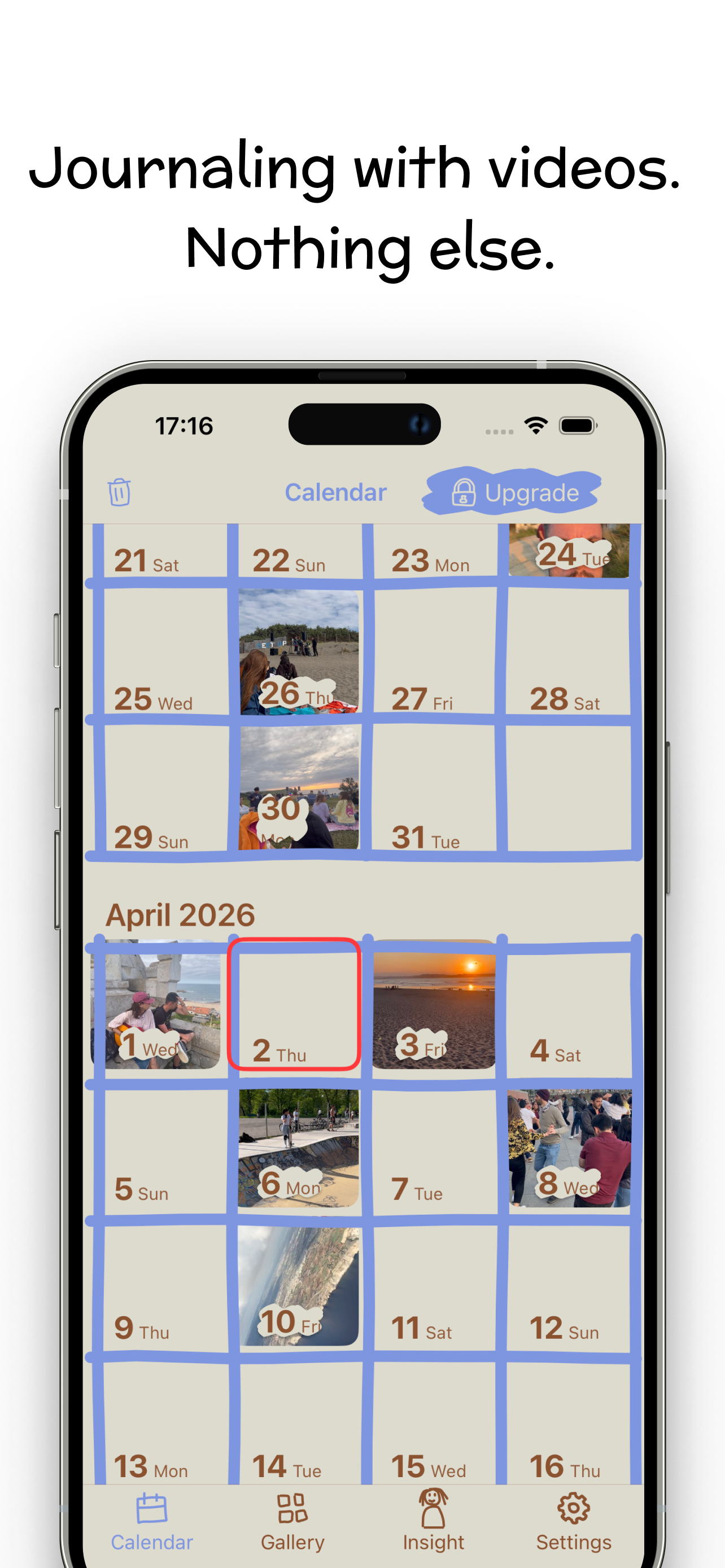
- A month you can see. Video Diary's home screen is a calendar with a thumbnail on every day you recorded. You notice the gaps, you tap back into a random Tuesday in April, and the diary starts to feel like a place rather than a list. Journal does have a calendar, but it's inside Insights, and the main view is a feed.
- The film at the end. Recording is the habit; watching it back is the reward. The montage maker stitches your days into one movie at whatever clip length you like. Journal has no equivalent, so you'd be exporting clips and cutting them in iMovie yourself. I wrote up how to make a memory montage both ways if you want to see the difference.
- Longer recordings don't hit a wall. Journal treats video as an attachment with a size cap. People on Apple's own forums describe recording in Journal and being told at the end the attachment was too big to save, losing the clip. iOS 27 raised the limits, but a video-first app stores clips as the entry itself.
- Nothing reads your entries. iOS 27's new dynamic prompts are generated from what you've already written, so something is interpreting your diary to produce them. Video Diary's daily question is a fixed list I wrote. I've gone into which journals still keep AI out entirely separately, because it's become its own shopping question this year.
Can Apple Journal be your video diary?
It can, and some people make it work. The question is whether you'll still be doing it in March.
The deciding axis is simple: are you writing with pictures, or talking with a camera? Journal is built for the first. Its best ideas, like suggestions from your day, searchable text and multiple journals, all assume the words are the entry. Video lives inside that, the way a photo lives inside a letter.
A video diary is the reverse. The clip is the entry, and your face and voice carry what you'd otherwise have written. That changes what the app needs to be good at: getting to the camera instantly, showing you days rather than paragraphs, and giving the recordings somewhere to go. Journal isn't bad at those things by accident. They're just not what it was designed around.
If you've never kept any journal, that's the useful test: on a Tuesday when nothing happened, would you rather type three sentences or talk for sixty seconds? Answer that honestly and the app choice mostly makes itself. If you're not sure yet, my guide to starting a video diary that lasts past week two covers what actually decides it.
Who should switch, and who shouldn't
- Stay with Apple Journal if most entries are written, if you want one free app across iPhone, iPad and Mac, or if searching old entries matters to you. It's a good app and it's the right one for you.
- Stay with Apple Journal if you're on the fence about journaling at all. Find out whether the habit sticks before downloading anything.
- Switch if you keep opening Journal to record a clip and it feels like filling in a form first, or if you've had a long recording rejected.
- Switch if what you actually want at the end of the year is to watch it, not read it.
- Use both if you like to write some nights and talk others. They don't conflict, and plenty of people keep a written journal and a video diary for different moods.
If you've decided you want a dedicated video app but haven't picked one, I've compared the video journaling apps worth trying, including the ones that transcribe and the ones that beat mine at specific things.
If you'd rather talk than type
Video Diary opens on the camera. Tap REC, say what's on your mind, and the day lands on your calendar with an optional mood and note. No account, no feed, and no model anywhere near what you say. When you want to look back, the montage maker turns your days into one film.
Free for daily journaling on iPhone (iOS 17.6+), Apple silicon Mac and Vision Pro; 4.5 stars from 37 ratings on the US App Store, which is a small base, so treat it as a signal. Premium is $6.99 a week or $44.99 a year in the US and adds palettes, fonts, Face ID lock and iCloud backup, not the ability to record. Try Video Diary free. No Android version, and it isn't a native iPad app.
Frequently asked questions
Can you record video in Apple Journal?
Yes. You can record a video with the camera from inside a new entry, or attach one from your photo library, alongside text, photos, audio and location. The video is an attachment to a written entry rather than the entry itself, so the app is organised around the text you write, not the clip.
Is there a video length limit in Apple Journal?
Apple does not publish one, but there is a size cap on attachments. Users on Apple's own support forums report recording a video inside Journal and being told at the end that the attachment was too big to save. iOS 27 raised the attachment limits, but if you routinely talk for several minutes, test it before relying on it.
Does Apple Journal use AI?
Journal has always offered on-device suggestions built from your photos, workouts, places and music. iOS 27 adds dynamic writing prompts generated from what you have already written, which means your entries are read to produce them. There is no chat assistant. If you want nothing interpreting your diary, a journal with no model in it is the stricter choice.
Learn more: journals that keep AI out →Can Apple Journal turn my videos into a montage?
No. Journal has no montage or movie feature. To get a film of your year you would export the clips and cut them together yourself in iMovie or another editor. Dedicated video diaries such as Video Diary and 1 Second Everyday build the montage for you from the days you recorded.
Learn more: apps that build the montage for you →Is Apple Journal private?
Reasonably. You can lock it with Face ID or your passcode, and entries synced to iCloud are encrypted in transit and on Apple's servers. Apple's iCloud security overview lists Journal data as end-to-end encrypted when Advanced Data Protection is turned on, so switch that on if you want Apple itself unable to read your entries.
Learn more: what a private video diary needs →