 Video Diary
Day One can be a video journal, but only on a paid plan, and only in the sense that a letter can hold a photograph. The free tier takes no video at all. Silver and Gold let you attach clips to written entries, sync them everywhere, and encrypt them properly. What Day One doesn't do is treat the clip as the entry: it doesn't open on a camera, it doesn't lay your days out as a wall of clips, and it doesn't turn them into a film. If you write most days and film some, it's the best app you can pick. If you want to talk to your phone for a minute a day, you'll be paying for a writing tool and working around it.
Day One vs a video diary: the short version
| Day One | Video Diary | |
|---|---|---|
| Built around | Written entries, media attached | A video per day, note optional |
| Video on the free plan | No (text plus one photo per entry) | Yes, unlimited daily recording |
| Turns clips into a movie | No | Yes, built-in montage maker |
| Search what you said | Yes, for audio recordings up to 10 minutes | No, only the notes you type |
| AI in the app | Optional, on the Gold tier only | None |
| Sync and backup | End-to-end encrypted; multi-device sync on paid plans | On-device; iCloud backup is Premium |
| Platforms | iPhone, iPad, Mac, Apple Watch, Android, web | iPhone, Apple silicon Mac, Vision Pro |
| Price (US) | Free; Silver $8.99/month or $49.99/year; Gold $74.99/year | Free; Premium $6.99/week or $44.99/year |
Where Day One is better
Day One has 4.8 stars from about 118,000 ratings on the US App Store. That isn't luck, and most of what it's good at, a video diary can't touch.
- It's the better journal for writing. Long entries, formatting, multiple journals, tags, and search across years of text. If you think in sentences, nothing I make comes close.
- It can make your voice searchable. On the paid plans you can record audio inside an entry and Day One transcribes up to ten minutes of it. Six months later you can search for "job offer" and find the night you talked it through. Video Diary can't do that, because nothing listens to what you say. If finding things matters more to you than watching them, this point alone should decide it.
- It's everywhere you are. iPhone, iPad, Mac, Apple Watch, Android and a web app, all syncing. Video Diary is iPhone, Mac and Vision Pro, with no Android version and no native iPad app.
- Encryption on every tier. Even the free plan gets end-to-end encryption, which is still unusual. Your entries are encrypted before they reach Day One's servers.
- It's been around long enough to trust. People have kept Day One journals for over a decade. If you're choosing an app to hold twenty years of your life, a long track record matters.
Where a camera-first video diary is better
The difference isn't a missing feature. Day One assumes you came to write, and a video diary assumes you came to talk.
- Video is free here, and it's the paid part there. On Day One's free plan you can't attach a single clip. In Video Diary, recording every day costs nothing. Premium adds palettes, fonts, a Face ID lock and iCloud backup. The honest catch: without Premium your videos live only on your device, so if you want them backed up, both apps end up costing roughly the same per year.
- Fewer steps to the record button. In Day One, a video entry means creating an entry, opening the media options, recording, then returning to a text page that expects you to write something. Video Diary opens on the camera. That gap sounds trivial until you notice it's where daily habits die: every screen between the app icon and REC is a chance to decide "not tonight".
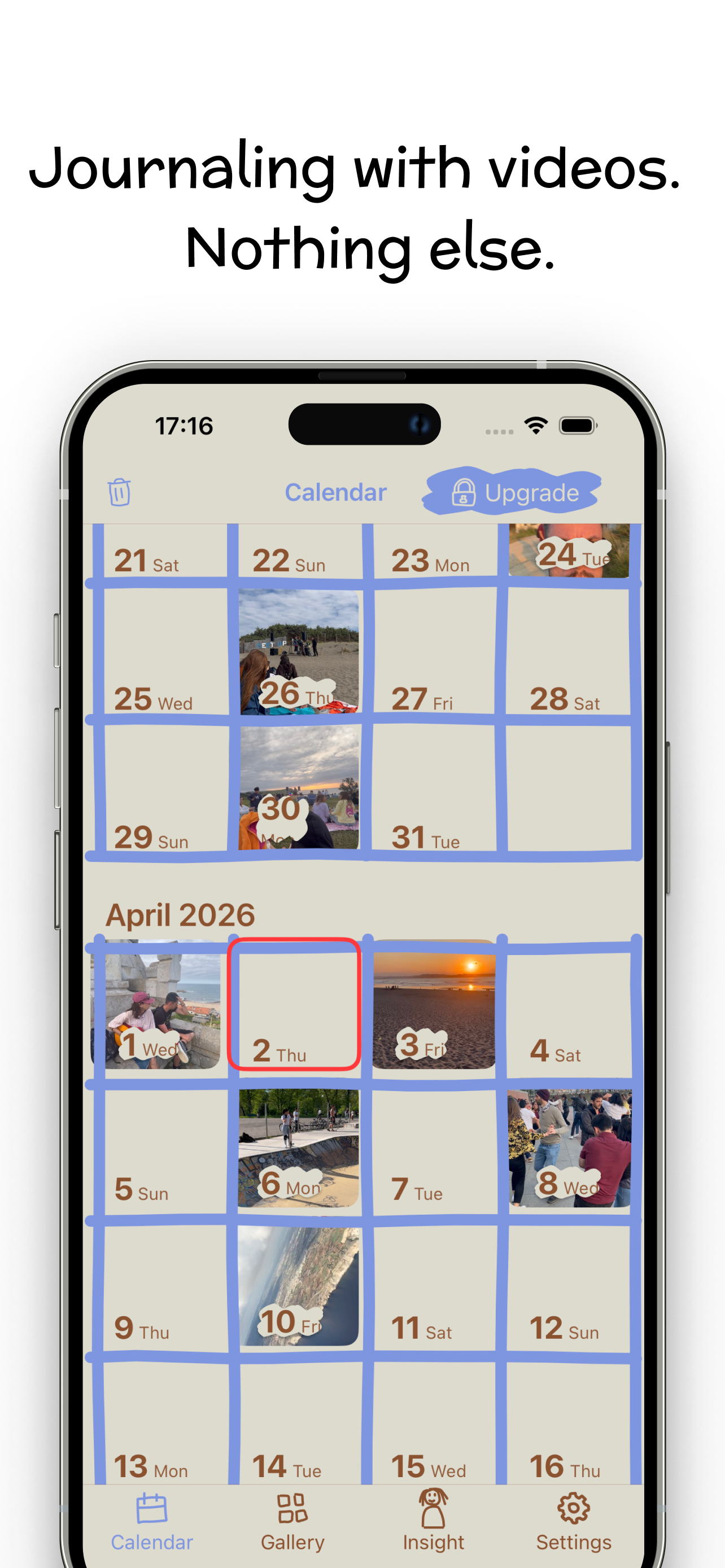
- Your days, not your paragraphs. The home screen is a month calendar with a video thumbnail on every day you recorded. You see the gaps and the streaks, and the diary starts to feel like a place. Day One organises everything around entries, which is right for writing, but a year of clips with a line of text under each reads as a list rather than a year you can see at a glance.
- The film at the end. Recording is the habit; watching it back is the reward. Video Diary's montage maker stitches your days into one movie at whatever clip length you like. Day One has nothing like it, so you'd be exporting clips and cutting them yourself. I wrote up how to make a memory montage both ways if you want to compare.
- No length surprises. Day One's help pages disagree on whether video is capped at five minutes: one says yes, another says only the Android camera stops there. In a video-first app, the clip is the entry, so there's no attachment limit to bump into.
- No AI tier to decline. Day One's AI lives in Gold and is opt-in, which is a fair way to do it. Video Diary simply has none, and no account either. I've covered which journals still leave AI out separately, including where Day One fits.
Can Day One be your video diary?
Yes, if you pay for Silver, and some people make it work for years. The real question is what you want back at the end.
If the answer is "to find things", Day One wins. A searchable archive is what it was built to be, and recording audio instead of video gets you most of a spoken diary with transcripts you can search. That's a better setup than anything a video app offers, mine included.
If the answer is "to see myself", it doesn't. A face and a voice carry what you'd otherwise have written: how tired you looked in March, how you laughed about something that seemed huge at the time. The payoff is watching a month in a minute, and Day One gives video nowhere to go but into a list.
The other quiet difference is cost. Daily video is heavy, and on Day One it's the reason you're subscribing. If you're not sure the habit will stick, paying $49.99 to find out is a bigger ask than opening a free app and pressing record. My guide to starting a video diary that lasts past week two covers what actually decides whether it sticks.
Who should switch, and who shouldn't
- Stay with Day One if most of your entries are written and the clips are occasional. You already have the best tool for that.
- Stay with Day One if you use Android, an iPad or a browser to journal. Video Diary won't follow you there.
- Stay with Day One if you want to search what you said. Record audio and let it transcribe.
- Switch if you're paying for Silver mainly to attach videos, and you rarely write more than a line.
- Switch if what you want in December is a film of the year, not a searchable archive.
- Use both if you write some nights and talk others. Plenty of people keep a written journal and a video diary for different moods, and they don't get in each other's way.
If you've decided on a dedicated video app but haven't picked one, I've compared the video journaling apps worth trying, including the ones that beat mine at specific things. And if Apple's free app is the other one on your list, here's how Apple Journal handles video.
If you'd rather talk than type
Video Diary opens on the camera. Tap REC, say what's on your mind, and the day lands on your calendar with an optional mood and note. No account, no feed, and no model anywhere near what you say. When you want to look back, the montage maker turns your days into one film.
Free for daily journaling on iPhone (iOS 17.6+), Apple silicon Mac and Vision Pro; 4.5 stars from 39 ratings on the US App Store, which is a small base, so treat it as a signal. Premium is $6.99 a week or $44.99 a year in the US and adds palettes, fonts, Face ID lock and iCloud backup, not the ability to record. Try Video Diary free. No Android version, and it isn't a native iPad app.
Frequently asked questions
Can you add video to Day One for free?
No. The free Basic plan allows unlimited text entries and one photo per entry, but no video. Video needs Silver, at $8.99 a month or $49.99 a year in the US, or Gold at $74.99 a year. Both paid plans allow up to 30 photos, videos or audio recordings in a single entry.
Is there a video length limit in Day One?
Day One's own help pages don't agree. Its pricing guide lists a five-minute limit for video, while its media guide says only the Android in-app camera stops at five minutes and that the Apple apps don't cap clips by length. If you talk for longer than five minutes, test it before you rely on it.
Can Day One transcribe what I say?
Yes, for audio. On the paid plans you can record audio inside an entry, and Day One transcribes recordings of up to ten minutes into searchable text. Its documentation describes transcription for audio recorded in the app, not for imported files or video clips, so a spoken diary you want to search later works best as audio.
Does Day One use AI on my entries?
Only if you pay for Gold and turn the features on. Gold, launched in April 2026 at $74.99 a year, adds Daily Chat, summaries, Go Deeper prompts, entry highlights, title suggestions and image generation. Day One says the features are optional and don't touch entries unless you use them. Basic and Silver don't include them.
Learn more: journals that keep AI out →Is Day One private?
It's one of the better ones. End-to-end encryption is included on every plan, including the free one, so your synced entries are encrypted before they leave your device. You also need a Day One account to sync, which means your journal lives on Day One's servers in encrypted form rather than only on your phone.
Learn more: what a private video diary needs →